
Scan Type Cleanup
Note: This is a project-wide adjustment. It is Only available to those with Owner access.
Description
When sessions are imported into XNAT, their scan types are defined in the original DICOM files. This can be useful, but it may also contain tiny variations that are no longer relevant to your project. These variations can complicate the process of downloading sessions from CNDA, if you have to hunt down all the variations in the way that scans of similar types can be named.
This feature, new in CNDA 1.6, addresses this issue for project owners by letting you rename scan types after they have been uploaded.
Instructions
How to Clean Up Scan Types
- Open a Project.
- Select Scan Type Cleanup from the Actions box.
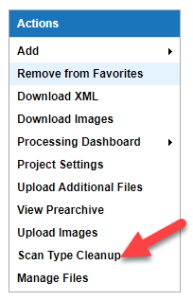
- A table displays with listings for all of the scan types within the project.
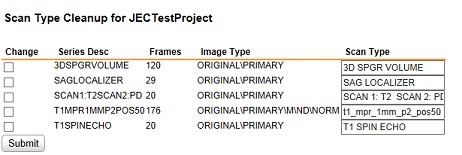
- Click the checkbox in the change column for the row to be renamed.
- Enter the new name in the Scan Type column.
- Click Submit when complete.
Example: Changing Scan label T1SPINEECHO
- From the Scan Type Cleanup table, click the checkboxes for the T1SPINEECHO entries.
- Enter a new label in the box under Scan Type -- we are changing the label to T1SP.

- Click Submit.
- A Submitting message will appear and then the project details page will reappear.
- Looking at the Session details page:
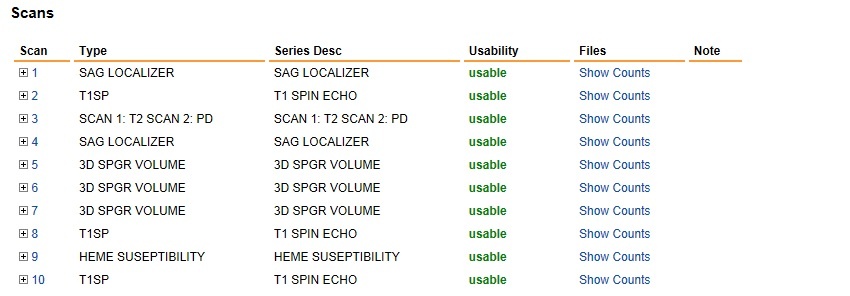
- The changes are visible under the Type column, while the original label is still showing under Series Desc.